INSTALLING
ETL ENGINE USING WINDOWS INTERNET EXPLORER 8
When
attempting to install the ETL Engine using Windows Internet Explorer

The Compatibility View is the
solution to this problem.
1. ENABLE THE COMPATIBILITY VIEW
Click
the Compatibility
View button  located to the right side of the address bar.
When you access Artus Web G6 again, the Compatibility View will be activated
automatically; however, when you delete the browsing history, you must enable
this option again.
located to the right side of the address bar.
When you access Artus Web G6 again, the Compatibility View will be activated
automatically; however, when you delete the browsing history, you must enable
this option again.
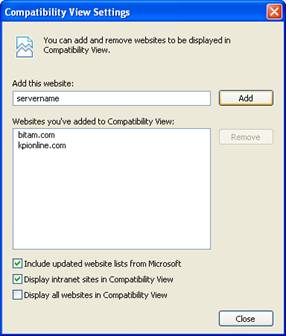
2. COMPATIBILITY VIEW SETTINGS
To add
your Web server to the list of sites that will be opened by default using the Compatibility
View, select the Compatibility View Settings in the Tools
menu.

Enter the server address from
which you will access Artus Web G6 and click the Add button. To finish
click the Close button.